

Same home. Same rates. Same price.

Write down what a clean starts from and what changes the price: rooms, how often, the extras. WellKept works each price out from them, line by line, whoever does the quoting.

A walkthrough is a call with the people who build WellKept.

A cleaning company owner at the desk in her home office, on a call while she works on her laptop, her van outside the window
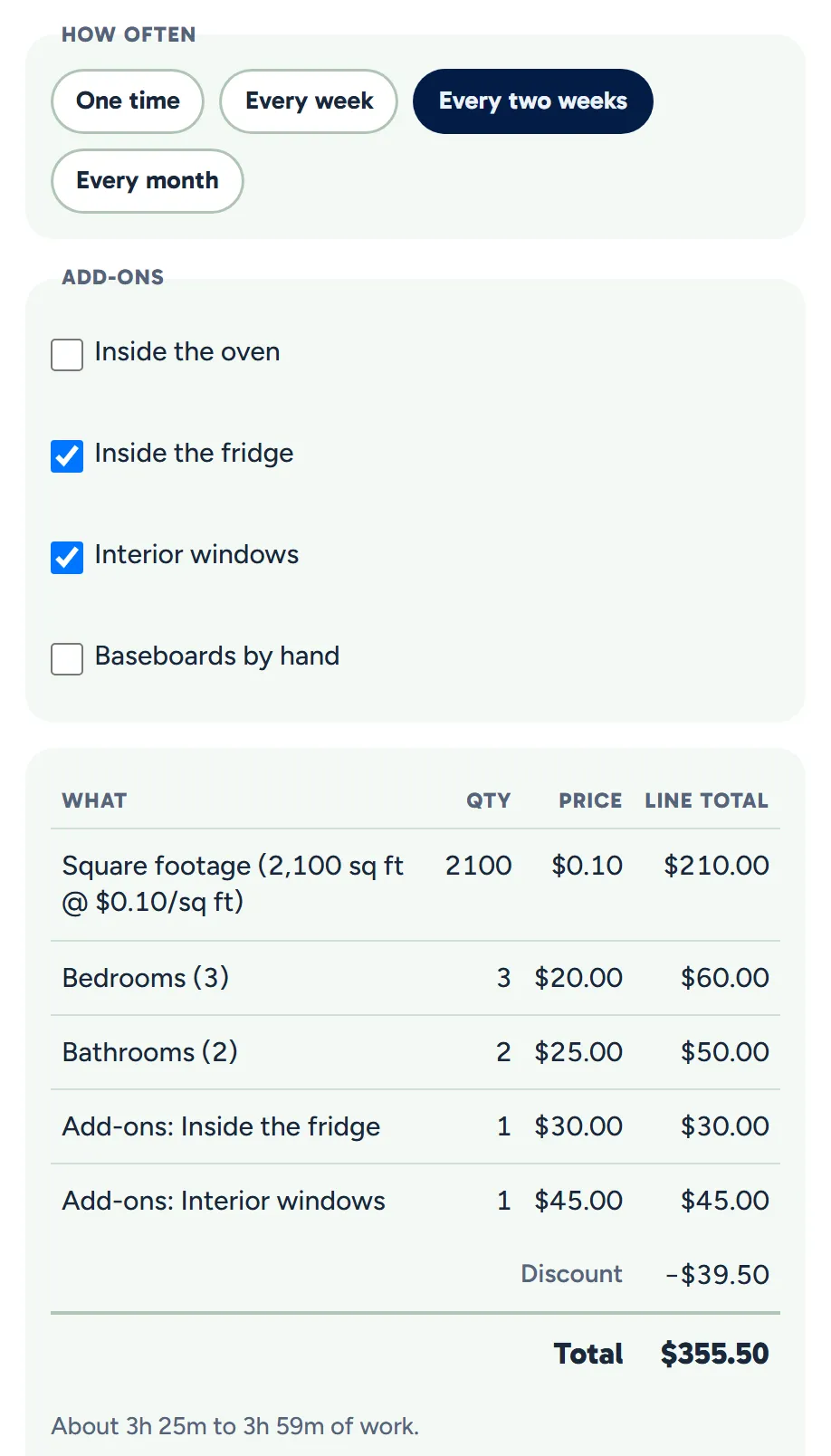
The calculator with every two weeks chosen and two extras ticked, each line priced from the business's rates, then the discount, the total and the time
Example data

Your rates, written down once.

Set them in Settings, and change one whenever you need to. Tap the dots on the screens to see what each part does. The screens are the real product with example data.

The owner at her desk, working on her laptop
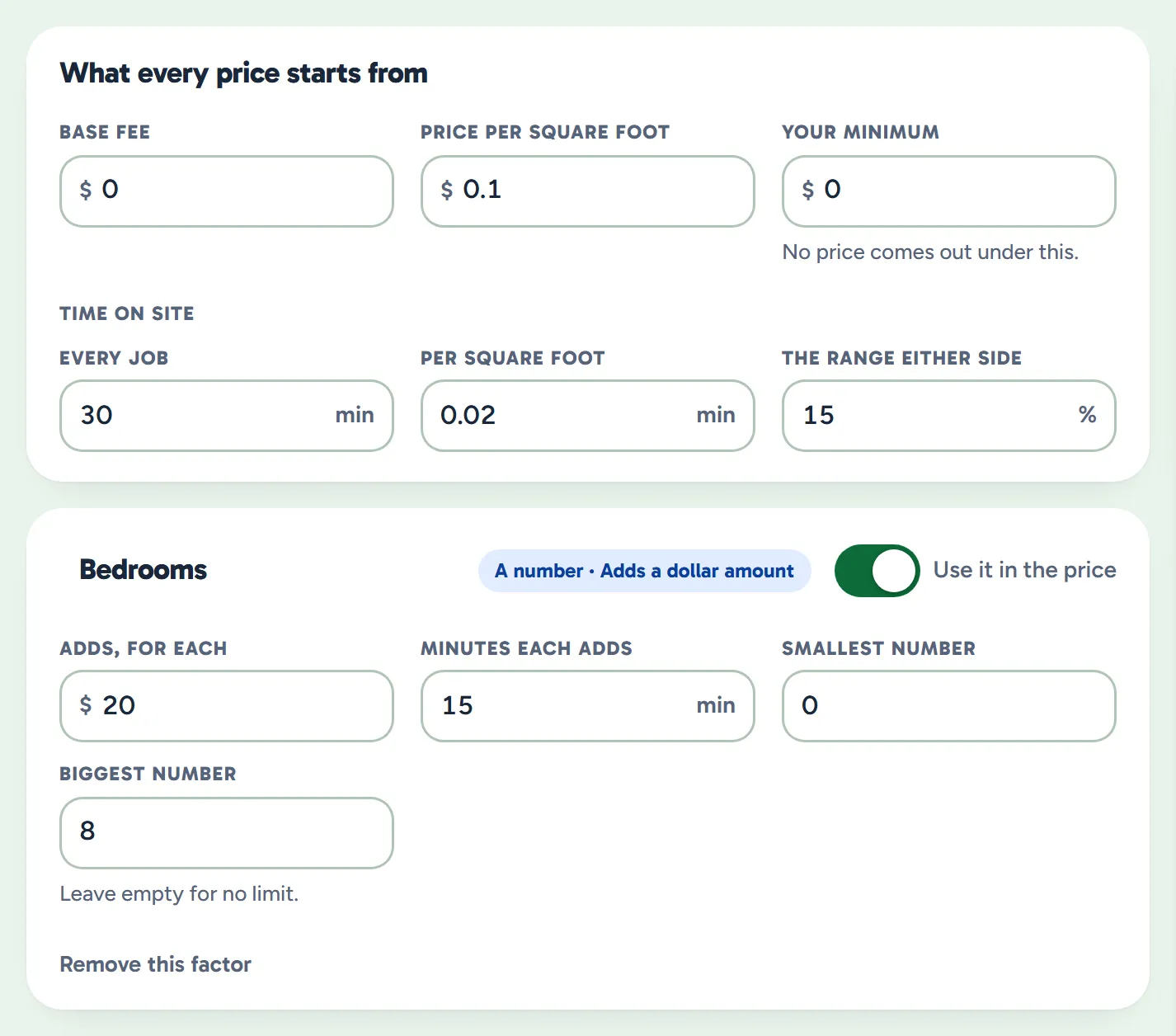
Settings, Pricing rules: the base fee, price per square foot, minimum and time on site, and the Bedrooms factor with its price and minutes
Example data

What a clean costs

In Settings: a starting price, and the things that change it.

  • What every clean starts from. A base fee, a price per square foot and a minimum the calculator never prices under.
  • What changes it. Rooms, how often and the extras, each asked as pick one, pick any or a number.
  • Dollars, percents and minutes. A choice can add dollars or take a percent off, and add minutes to the time.
  • Factors of your own. Add one for stairs, pets or a pool, and switch one off without losing it.

The owner in her armchair in the evening with her laptop on her lap, a lamp lit and a mug on the side table beside her
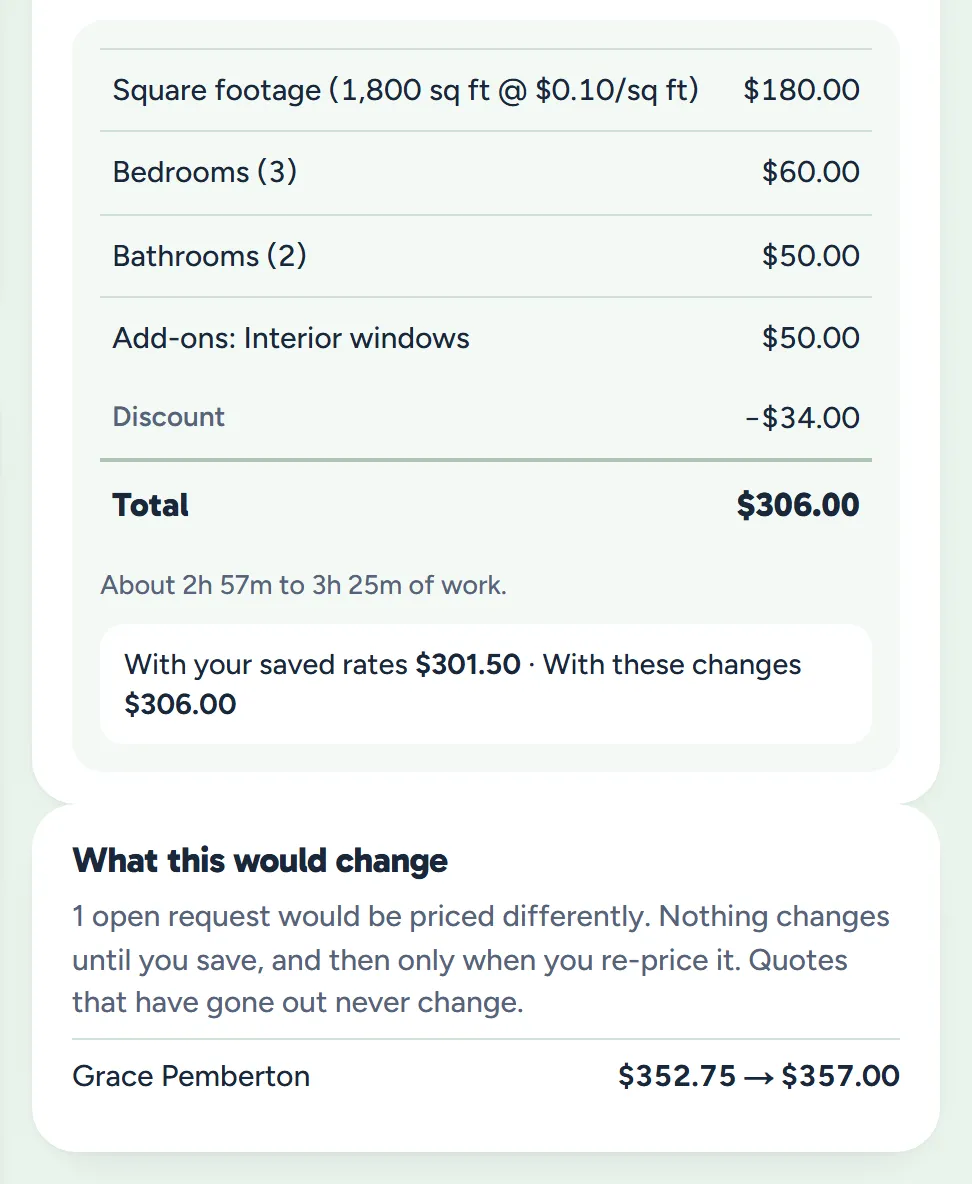
One home's price with the saved rates and with one extra priced higher, a lead's draft quote at its price now and at the new rates, and a note that sent quotes never change
Example data

Change a rate any time

When your costs move, update the rate in Settings and save it.

  • The next price uses it. From then on the calculator, and a lead's form when they send it, price with the rates you saved.
  • See it on a home you know. Price a home you already clean in the calculator, and see its price with the new rates.
  • Quotes already made stay put. A quote that has gone out never changes, and a draft keeps its price until you change it.

From the call to a draft quote.

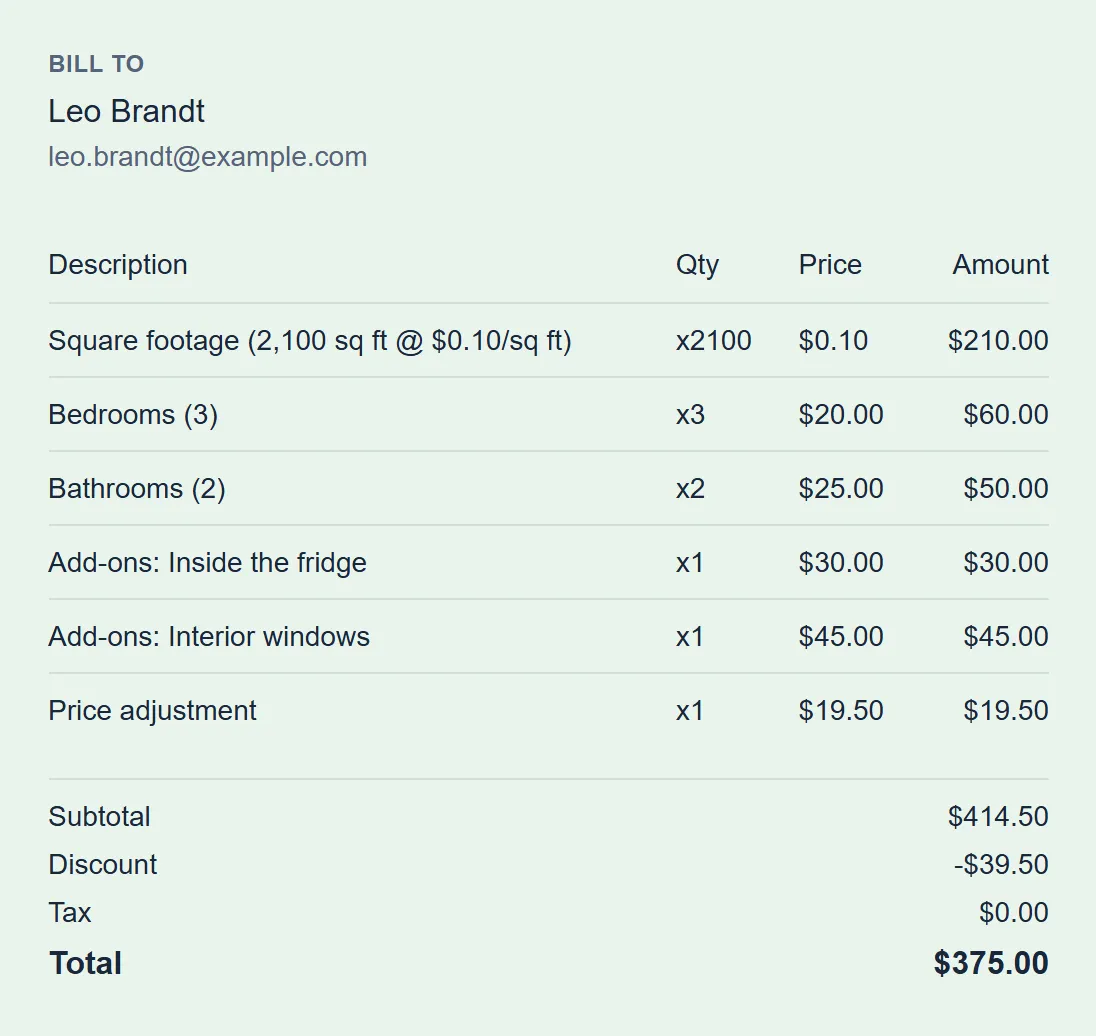
Price the job while you talk, pick the customer, and save it as a quote whose lines come straight from the calculator.

  • Your price, if you want it. Type a different price, and the difference goes on the quote as its own line.
  • For a new lead or a regular. Pick anyone on your customer list, including people who haven't booked yet. Add someone new as a customer first.
  • A draft, not a send. It opens as a draft quote to check, and nothing goes out until you send it.
A draft quote for Leo Brandt with the calculator's lines, a price adjustment, the discount and the total
Example data

Their own answers, priced the same way.

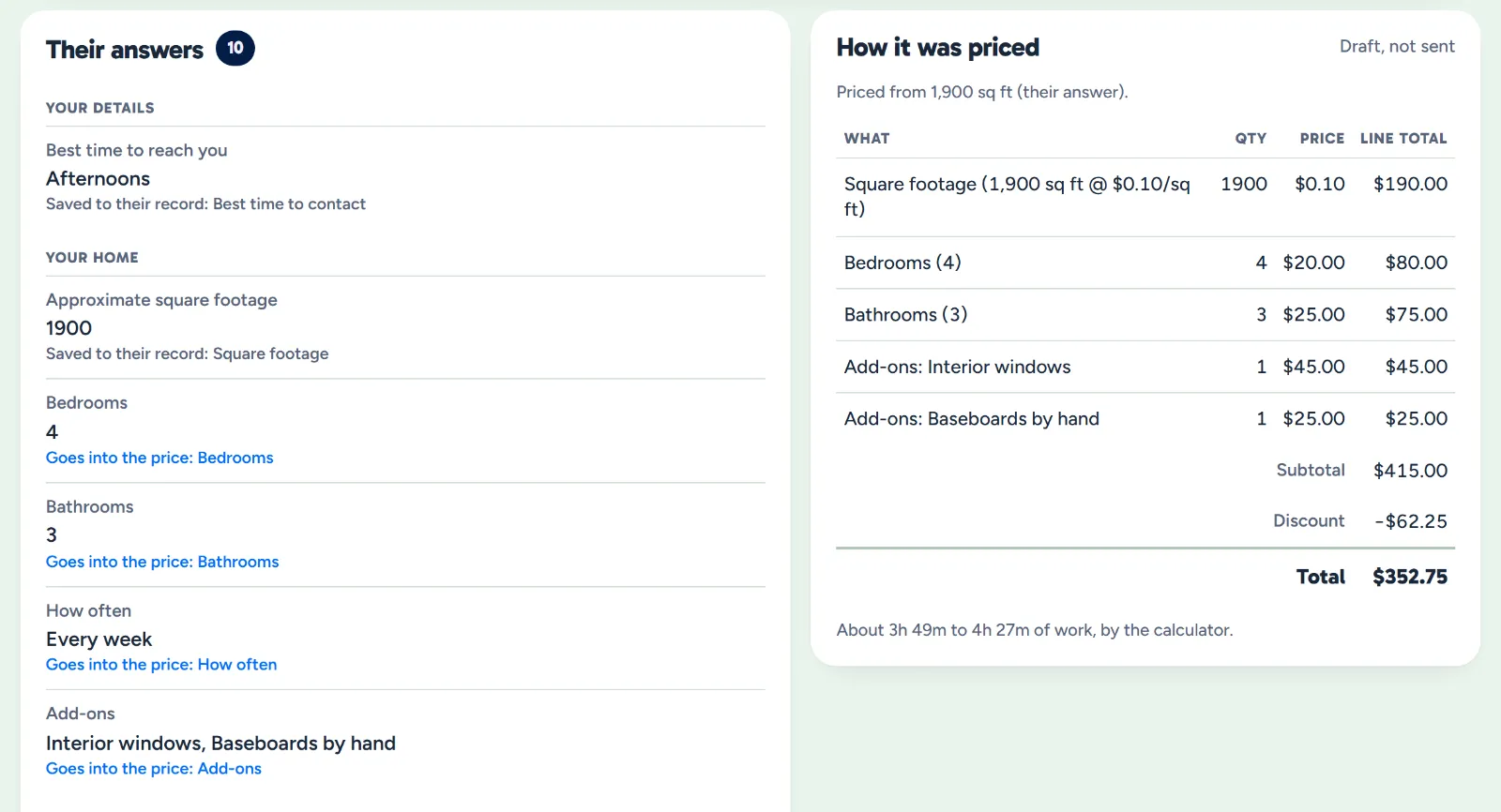
When a lead sends your intake form, their answers go through the same calculator, with the rates you price a call with.

  • Priced when they send it. A draft quote is waiting, worked out line by line from your rates.
  • Not sure of the size? They can say so, and the size comes from your bedrooms-and-bathrooms table, flagged for you to check.
  • Fix what they got wrong. The draft is yours to change before it goes out: edit any line, or price it again in the calculator.
A lead's request: her answers, the ones tied to a price factor marked with the part they feed, beside how it was priced: the draft quote's lines, total and time
Example data

What owners ask before they set their rates.

Can I price by the hour instead?

Not by the hour. Prices come from the size, the rooms and the factors you set. The calculator also shows about how long each clean will take, from the minutes you give each part, so you can check a price against your hourly rate.

Can my office change my rates?

Only if their role allows it. Changing your rates is its own permission, which the Owner, Admin and Manager roles have. The Sales role prices jobs with your rates and can set a different price on a quote, but can't change the rates.

What happens to quotes I've sent when I change my rates?

Nothing. Saving new rates never changes a quote. Draft quotes from a lead's form keep their price too, until you choose to re-price them.

See it with your rates.

Bring the prices you quote today, and we'll show you how they fit.

The owner on her porch swing with a coffee at the end of the day while her two cleaners wave from beside the van